
01
Plan
Build shifts, fixed schedules, open work, projects, and coverage before the day starts.
Schedule shifts, clock time, and keep daily work moving from one practical workspace—for teams that work by shift, project, or both.
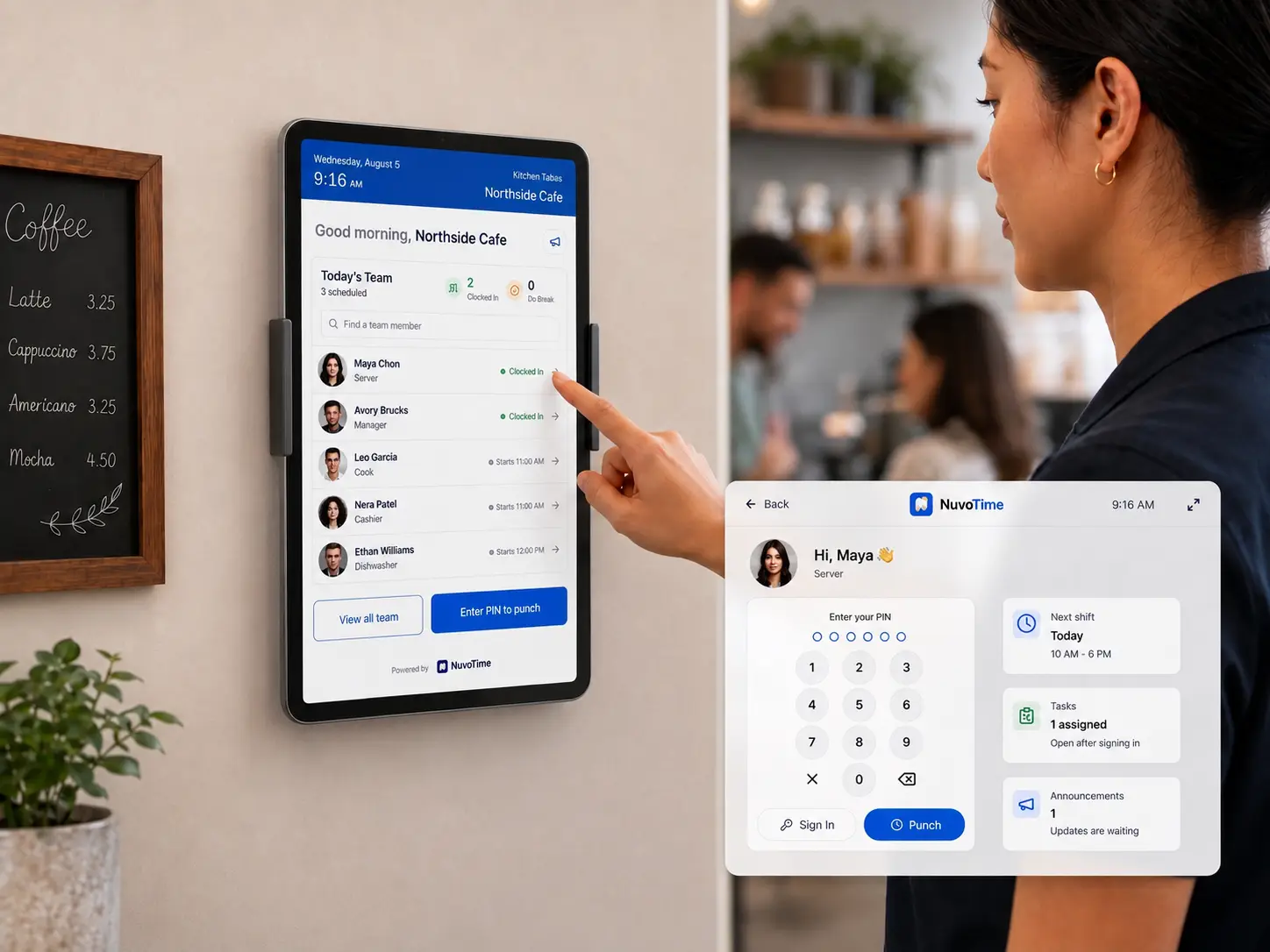
Shift teams
Keep every shift moving
Built for small teams that coordinate people, time, and daily work
One connected workday
NuvoTime keeps planning, employee action, proof of work, and manager follow-up connected—without forcing every team into the same workflow.
Build shifts, fixed schedules, open work, projects, and coverage before the day starts.
Employees clock in, take breaks, see assignments, and complete the work in front of them.
Tasks, forms, reports, photos, and announcements keep the day visible without another group chat.
Managers review attendance, follow-up, leave, project time, and gross earnings in context.
Keep planned work and factual attendance together, so coverage problems and time exceptions make sense at a glance.
Use quick scheduling, planner views, templates, fixed schedules, and open shifts.
Review availability, coverage, holidays, break rules, and other warnings in context.
See clock activity, breaks, missing punches, corrections, and overtime beside the schedule.
Downtown · August 10–16
Draft schedule · 132 planned hours
Maria S.
Server
John D.
Cook
Anna K.
Host
Kevin R.
Closer
Coverage
1 open closing shift
Availability
1 conflict to review
Attendance
Yesterday reconciled
Access that fits the workplace
Give each team the right level of access without requiring every employee to use the same device—or even have a personal account.
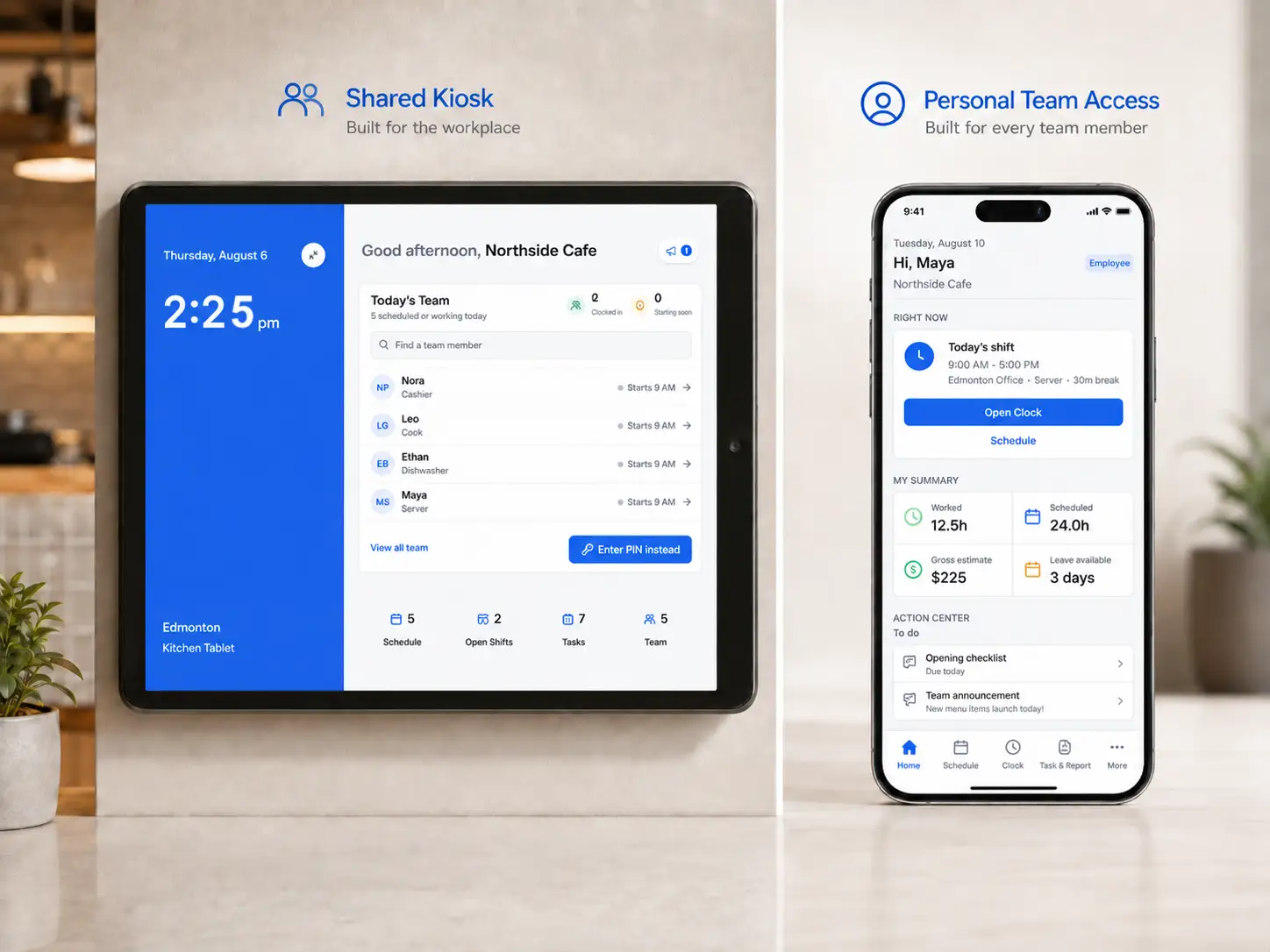
Use a phone, tablet, iPad, Chromebook, laptop, or desktop computer as a location kiosk. Employees can clock time, take breaks, see assigned work, and enter personal mode with a PIN.
Employees can open NuvoTime in a supported browser on a phone, tablet, or computer, or install it from the browser without using an app store. Their schedule, time, requests, and assignments stay together in one place.
Place an NFC tag or printed QR code at an entrance, job site, or customer location. Employees open NuvoTime, identify themselves, and confirm attendance without waiting for a shared kiosk.
How a checkpoint works
Tap or scan
NFC tag or QR code
Identify
Account or PIN
Confirm
Clock in or out
NuvoTime generates the secure checkpoint URL and QR code. A manager can print the code or write the same URL to a compatible NFC tag.
Replace the paper clipboard and the disappearing group-chat message with work that is assigned, completed, and reviewable.
Create one-time, repeating, shared, shift, project, or equipment-related tasks for the people responsible.
Know what is complete, still in progress, overdue, or waiting for a manager to review.
Route reports, handoffs, maintenance issues, and employee responses to the right reviewer.
Operations inbox
Tasks, reports, announcements, and follow-up
Opening checklist
In progressDowntown · Front of House
11 of 14 fields · 3 employees contributed
Freezer temperature issue
Follow upEmployee report · Photo and temperature attached
Assigned to Maintenance · Response required
Holiday availability
CurrentSent to all employees at both locations
14 read · 9 yes · 3 no · 2 pending
Shift handoff
ReviewedClosing team → Opening team
Reviewed · Follow-up note added
Tasks
22 / 27
Reports
3 open
Notices
86% read
Photos
Private
Connect customers, work, time, evidence, and billing without turning day-to-day operations into a complex enterprise project-management process.
Keep customers, contacts, projects, jobs, and tasks connected instead of spreading the record across separate tools.
Assign team members and use calendars, dependencies, Kanban, progress, and the Project Timeline to keep upcoming work clear.
Capture time, completed work, forms, reports, photos, PDFs, and secure links while the details are still useful.
Connect products and services, approved billable work, invoices, payments, and customer communication to the same history.
Northstar Property Group
Active customerLinda Chen · Operations contact · Owned by Avery
Relationship
3 activities this week
Spring service contract
Project delivery
Follow-up completed
9:20 AMProposal accepted by Linda Chen
Project started
10:05 AMMonthly property service · 4 jobs
Work submitted
2:42 PM2h 35m · Photo and GPS captured
Next attention
Review completed work
Two submitted time logs and one customer report are ready.
Customer, work, and billing stay connected.
Keep customer messages, shared addresses, templates, ownership, and follow-up status visible to the right people without adding a heavyweight help-desk system.
Open the email app your team already uses, send from an approved business address, or bring sending and receiving into NuvoTime.
Use approved senders and shared templates for customer follow-ups, project updates, invoices, and everyday service replies.
Let permitted team members work from addresses such as hello@ or support@, assign an owner, and move messages from Open to Waiting or Resolved.
Link messages to customer work, or turn a new sender into a contact or customer without losing the original conversation.
Shared Inbox
Connectedsupport@northside.example
Linda Chen
Re: Spring service schedule
Thursday morning works for our team.
Marco Ruiz
Updated site access
I added the new entry instructions.
Northstar Billing
Invoice received
Thank you. Our finance team has it.
Re: Spring service schedule
From: Linda Chen <linda@northstar.example>
To: support@northside.example
Hi Avery, Thursday morning works for our team. Please ask the crew to use the east service entrance when they arrive.
Customer, project, and sender permissions stay attached.
Build the form your business needs once, then use it wherever work is assigned, reported, handed off, or reviewed.
Start from a template or combine checkboxes, choices, numbers, temperatures, notes, photos, GPS locations, and asset scans.
Attach it to a task, project, inspection, handoff, equipment workflow, or proactive employee report.
Review who submitted it, what happened, and what needs follow-up. Switch to the image gallery and Focus View when visual progress or evidence matters most.
Guest room inspection
Follow upHarbour Hotel · Housekeeping
Submitted by Maya
Today · 10:42 AM
Guest room
Text412
Bed and bathroom checked
ChecklistComplete
Room temperature
Number21°C
Issue found
NoteBedside lamp is not working
Photo
1 attached
Location
Verified
Follow-up
Maintenance
All completed forms stay searchable
Filter by form, date, person, project, asset, or status.
Built for different ways of working
Choose the workflow that fits your team. Shared operational tools support every work style, while Both connects scheduling and attendance with customer and project work.
Track customers, projects, jobs, billable time, approvals, evidence, and customer invoices without mixing project work into the shift schedule.
Maple Ridge Dental
Monthly deep clean
Duration
2h 35m
Evidence
2 photos
Location
GPS captured
Status
Submitted
Scan an asset QR code or NFC tag to check status and responsibility, check eligible items in or out, report issues, and keep maintenance follow-up connected.
Floor Scrubber 02
Southside
Carry approved time, leave, overtime, vacation pay, premiums, and other gross earnings forward for payroll handoff.
Gross-pay review
Aug 1–15 · 18 employees
Let one employee work across permitted locations without counting them twice, while practical privacy and reliability controls stay in place.
Clear payroll boundary
NuvoTime prepares and exports reviewed gross earnings. Use NuvoWage or another payroll system for income tax, CPP, EI, take-home pay, and remittances.
Schedules, kiosks, policies, timezones, and manager access stay connected to the right location.
Supported clock and break actions can queue offline and sync with duplicate protection.
Cloud images use private storage, controlled access, and configurable retention.
Capture location for selected work actions—not as continuous employee tracking.
Need the details?
The homepage keeps the main story simple. Open a category below when you need the implementation details.
Set up the workspace and decide who can work where and see what.
Build routine schedules quickly and review factual time in context.
Assign work, collect structured answers, and keep follow-up attached.
Organize project work and keep the time, tasks, and equipment history connected.
Keep customer relationships, shared-inbox follow-up, invoices, and email in the same work context.
Give the team practical communication without turning NuvoTime into a distracting group chat.
Maintain traceable balances and prepare approved earnings for payroll.
Operate with clear access rules and resilient day-to-day actions.
Your work style determines the main workflow, not a crowded workspace.
During setup, choose Shift-Based, Project-Based, or Both and enable only the tools your business needs. NuvoTime keeps the workspace focused and lets owners change the subscribed work style when operations change.
Flexible capacity pricing
Select Shift-based, Project-based, or Both. Active employee capacity controls the included locations, while yearly billing gives you the lower monthly rate.
Active Employees
30
maximum active seats
Locations Included
2
business locations
Annual rate
$35
CAD / month
Billed $420 CAD yearly
Everything your selected work mode needs is included
Employees count once
An employee can work across permitted locations without being counted again.
Locations are bundled
Included location capacity increases with the selected employee tier.
No-card trial
Explore NuvoTime for 14 days with up to 5 active employees and 1 location. Cloud image uploads require a paid plan.
Need more than the self-serve employee or location capacity? Contact us.
Prices are in Canadian dollars. Taxes may apply.
Start with schedules and time, then enable the tasks, projects, assets, leave, and gross-pay tools your team actually needs.